Why doesn't YouTube show likes before you click?
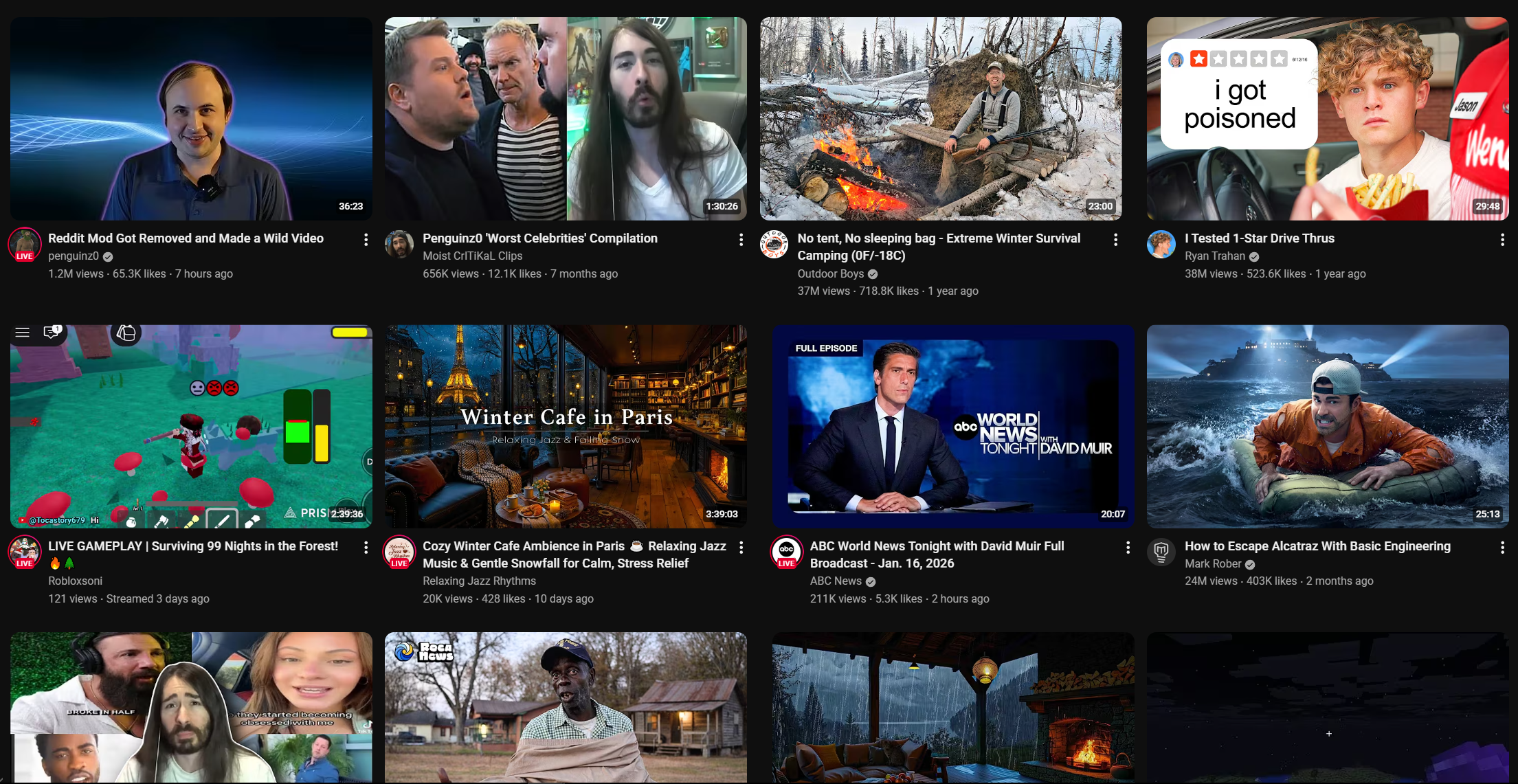
YouTube only shows like counts after you open a video. I built a Chrome extension that fetches them from YouTube's internal API and displays them inline on every video listing across the site.
Every video listing on YouTube shows you the view count and upload date. But the like count? Only visible after you've already clicked into the video. Why? The data is right there. YouTube has it. They just don't show it. You get "1.2M views" and "3 days ago" but somehow the like count doesn't make the cut.
I got tired of clicking into videos blind, so I built a Chrome extension that fetches like counts from YouTube's internal API and displays them inline next to the view count on every video listing across the site. The main feed, sidebars, post-video recommendations, all of it. The information YouTube should've put there in the first place.
The API
If you want YouTube video data programmatically, your official option is the YouTube Data API v3. Register a project, get an API key, and enjoy your 10,000 quota units per day. Where a single video lookup costs you 1 unit. For a Chrome extension that fires on every video visible on the page, that budget evaporates fast.
But YouTube's own frontend doesn't use the Data API. It calls an internal player endpoint that requires no authentication whatsoever:
const fetchLikes = async (videoId) => {
  const response = await fetch('https://www.youtube.com/youtubei/v1/player', {
    method: 'POST',
    headers: { 'Content-Type': 'application/json' },
    body: JSON.stringify({
      context: { client: { clientName: 'WEB', clientVersion: '2.20230327.07.00' } },
      videoId
    })
  });

  const data = await response.json();
  return data?.microformat?.playerMicroformatRenderer?.likeCount ?? null;
};
No API key, no OAuth, no quota. Just POST a video ID and get back the full player metadata. It's hacky, it's undocumented, and it could break any time YouTube decides to change their internal API. But it works, and it's the only reasonable way to do this without asking users to supply their own API credentials for something that should be a default feature.
Eight different ways to display a video
You'd think "find every video on the page" would be straightforward. It is not. YouTube uses a different custom element for practically every context a video can appear in:
const VIDEO_SELECTORS = [
  'ytd-rich-item-renderer',       // home feed
  'ytd-video-renderer',           // search results
  'ytd-compact-video-renderer',   // sidebar recommendations
  'ytd-grid-video-renderer',      // channel page grid
  'ytd-playlist-video-renderer',  // playlists
  'yt-lockup-view-model',         // newer lockup components
  'ytm-shorts-lockup-view-model', // shorts
  '.ytp-modern-videowall-still'   // end-of-video suggestion wall
].join(',');
Eight selectors. For videos. On the same website. And each one structures its metadata differently, so finding where to actually inject the like count is a hassle on its own.
Finding the video ID shouldn't be this hard
It gets worse. Extracting the video ID from these elements isn't consistent either. Most have a normal <a> tag with /watch?v= in the href. Fine. But some of YouTube's newer components decided to store the video ID in a CSS class name:
// lockup models hide the ID in a CSS class
const lockup = el.querySelector('.yt-lockup-view-model[class*="content-id-"]');
if (lockup) {
  const match = lockup.className.match(/content-id-([a-zA-Z0-9_-]{11})/);
  if (match) return match[1];
}
content-id-dQw4w9WgXcQ as a CSS class. That's where they put it. Not a data attribute, not an ID, not a property on the element - a class name.
And then YouTube doesn't properly update the DOM on some navigations. When you sort a channel's videos, the elements get recycled but the underlying video data changes without the DOM reflecting it cleanly. So you can't just trust what the DOM says and skip elements you've already processed. You have to track which video ID you last saw on each element and re-check it, because YouTube might've swapped the video out from under you without actually changing the element.
The result
251 lines, no dependencies, no build step. Just a content script that shows you information YouTube already has but won't surface. The whole thing is way hackier than it should need to be, but that's what happens when the platform won't add a number next to two other numbers.